
Bobby's Daycare Cleaning Tasks: How Night Shift Chores Work
How the night shift cleaning tasks in Bobby's Daycare work: the five-chore panel with a floor counter, trash pickups that pay cash, handprint window wipes, staying quiet while you clean, and confirming the shift through the front-door safe zone.
Quick answer
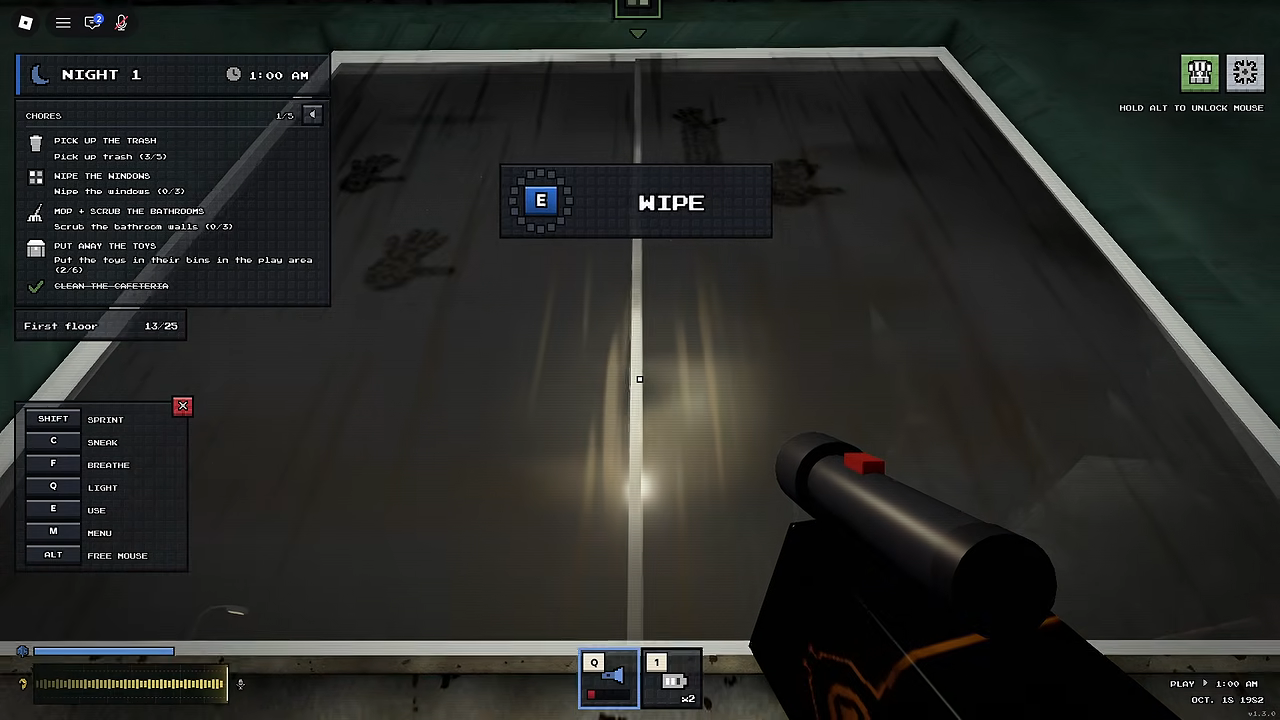
On the Chapter 1 Night 1 shift, Bobby's Daycare gives you a chore panel: five chores, each with its own progress, plus a floor counter such as 'First floor 10/25'. You complete the chores through on-screen prompts — a handprint window, for example, is wiped by holding E — and the panel tracks each chore's progress, so you can see what's left at a glance. When the chores are done, a glowing blue SAFE ZONE appears at the front door; get the whole crew inside before the countdown ends and the night is complete.
- Trash shows a 'PICK UP [TRASH]' prompt and pays cash — one Night 1 pickup paid +$14.
- Handprint windows: hold E on the WIPE prompt until the wipe completes.
- Broken glass makes sound the entity can react to — route around it or move quietly.
- Shift complete = blue SAFE ZONE at the front door, whole crew inside before the countdown runs out.
A night shift in Bobby's Daycare is a cleaning job with a monster problem: a company sends you into an abandoned daycare overnight, and the goal is to finish the cleaning before morning while keeping quiet, because something inside is listening. This page covers what the game asks you to clean during a shift, how each task works, how the chore panel tracks each chore's progress, and how the game confirms the whole night is done.

How the chore panel tracks your shift
Your shift's work list lives on the chore panel. It displays five chores, each with its own progress, next to a floor counter such as 'First floor 10/25'. That pairing is what lets you read the current cleaning objective and its progress at a glance: after every task, a quick look at the panel tells you what's done and what's still dirty, rather than leaving you to guess.
During a Night 1 run of Chapter 1, the full panel — all five chores plus the 'First floor 10/25' counter — was on screen from early in the shift and stayed up as the work went on. Our Chapter 1 walkthrough follows that whole night chore by chore.
The cleaning tasks a shift gives you
On the Chapter 1 Night 1 shift, the panel showed five chores with per-chore progress next to the floor counter, and the game drove the work through on-screen prompts. Here's how those tasks played out:
| Task | How you spot it | How to complete it |
|---|---|---|
| Trash pickup | Trash showing a 'PICK UP [TRASH]' prompt | Walk up and take it — it pays cash, with one pickup granting +$14 |
| Handprint window | A window marked with a handprint, showing a WIPE prompt | Hold E until the wipe finishes |
Trash is the task that pays as you go: picking it up grants cash — +$14 on one Night 1 pickup. Don't confuse it with the glowing pickups elsewhere in the daycare, though; those grant '+1 BATTERIES' as a separate pickup, not money.
Window wiping is the chore that shows off the game's tension. A window marked with a handprint displays a WIPE interaction, and you complete it by holding E. That sounds simple — right up until you're mid-wipe with a child humming nearby, which is exactly when the breathing minigame below kicks in.
Clean quietly — noise is the real hazard
The chores themselves are simple; the daycare makes them dangerous. Your job is to finish the cleaning before morning while staying quiet, because something inside reacts to noise.
The floor is the first trap. The game warns 'Watch your step! Broken glass makes sound.' and follows with 'Hear loud steps close by? Hide or stay quiet.' Walking over broken glass makes noise the entity can react to, so plan your cleaning route around glass where you can, and move quietly through it when there's no way around.
The tensest moments come when a chore puts you right next to whatever is inside. On Night 1, wiping a window while a child hummed nearby brought up a 'BREATHE IN / BREATHE OUT' minigame with a lung icon — follow its prompts to stay stable while you finish the chore. Our how to stay quiet guide goes deeper on moving around the daycare unheard.
How to confirm a chore — and the night — is complete
Progress and completion work on two levels. Per task, the chore panel is your progress tracker: each of the five chores carries its own progress, so you can see what's left at a glance. Per night, the game gives you an unmistakable end state: once the chores are finished, a glowing blue SAFE ZONE appears at the front door with a countdown. Get the whole crew inside before it runs out, and the shift closes with 'NIGHT 1 COMPLETE - THE WHOLE CREW MADE IT OUT.'
That crew condition matters in co-op: the completion message triggers once everyone is inside the safe zone, so once the chores are finished and the blue SAFE ZONE appears at the front door, group up and get the whole crew inside together instead of wandering off to explore.
Keep reading
New to the game? The beginner guide covers the fundamentals, and the survival guide collects the habits that keep a crew alive past Night 1. For the exact route through this shift, the first night walkthrough follows it step by step, and our Bobby's Daycare monster page covers what you're quietly cleaning around.
Related Guides
How to Stay Quiet
Sneak with C, step around broken glass, follow the F breathe prompts and hide when loud steps come close.
First Night Walkthrough
Step-by-step Night 1: powerbox start, five chores, noise hazards, breathing minigame and completion signs.
Beginner Guide: First Overnight Shift
Start Night 1 correctly: the powerbox prompt, quiet chores and the safe-zone exit before morning.